Before you start
You need telo connected in Claude and a sync from your iPhone. Artifacts work in Claude on the web, desktop and mobile. ChatGPT can also draw charts from the same prompts, as images or canvas, with less interactivity.
Every prompt names the telo connector and asks Claude to say how many records it found. If the page appears without numbers you recognise, it did not read your data: ask which records it used.
1. A year of training
One square per day makes consistency visible in a way a weekly total never does: the gap in August, the block of rides in September.
Days with two sports show only the main one, and hikes count as training unless you say otherwise.
Using the telo connector, read my workouts from the last 12 full months, without walks. Build an artifact: a training calendar with one small grid per month, one square per day, colored by the sport with the most minutes that day. Add my total workouts, hours and active days, and a legend with hours per sport.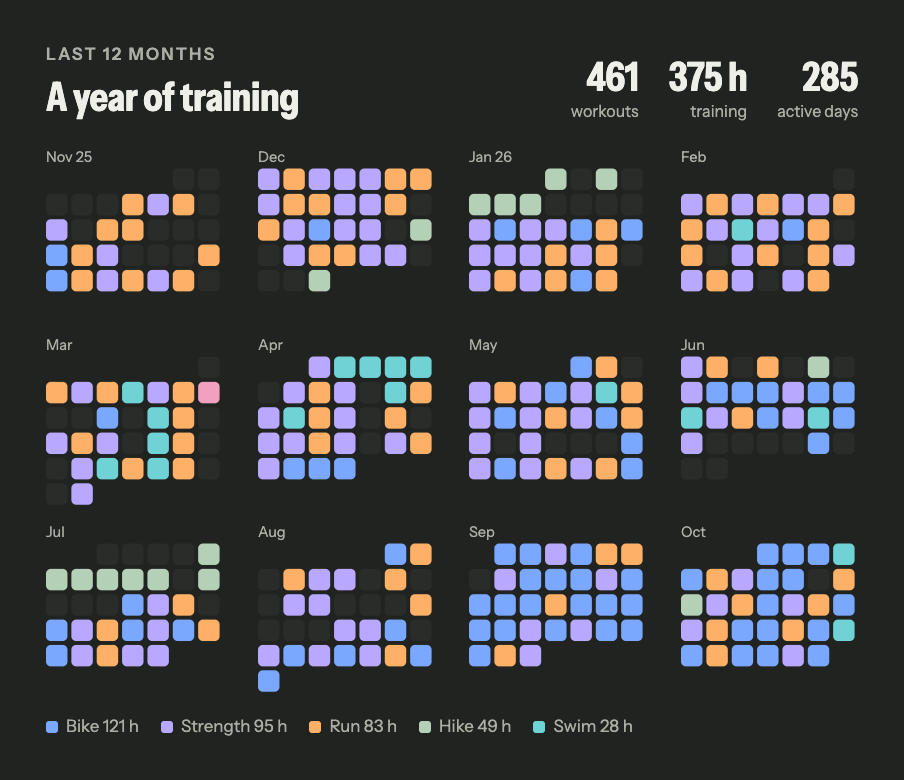
2. Every night, one line
Each bar is one night, so the shape of a year shows at once: late weeks, early starts, the nights that broke the pattern.
Nights without the watch on are simply missing. In this example only 154 of 365 nights were recorded, and a good artifact says so instead of averaging around them.
Using the telo connector, read my sleep from the last 12 months. Build an artifact where each night is one thin vertical bar from bedtime to wake-up, on a time axis from 8 pm to 10 am, colored by time actually asleep: 7 hours or more, 6 to 7, under 6. Treat anything starting between 6 am and 6 pm as a nap and skip it. Leave nights with no record as gaps and say how many nights you found.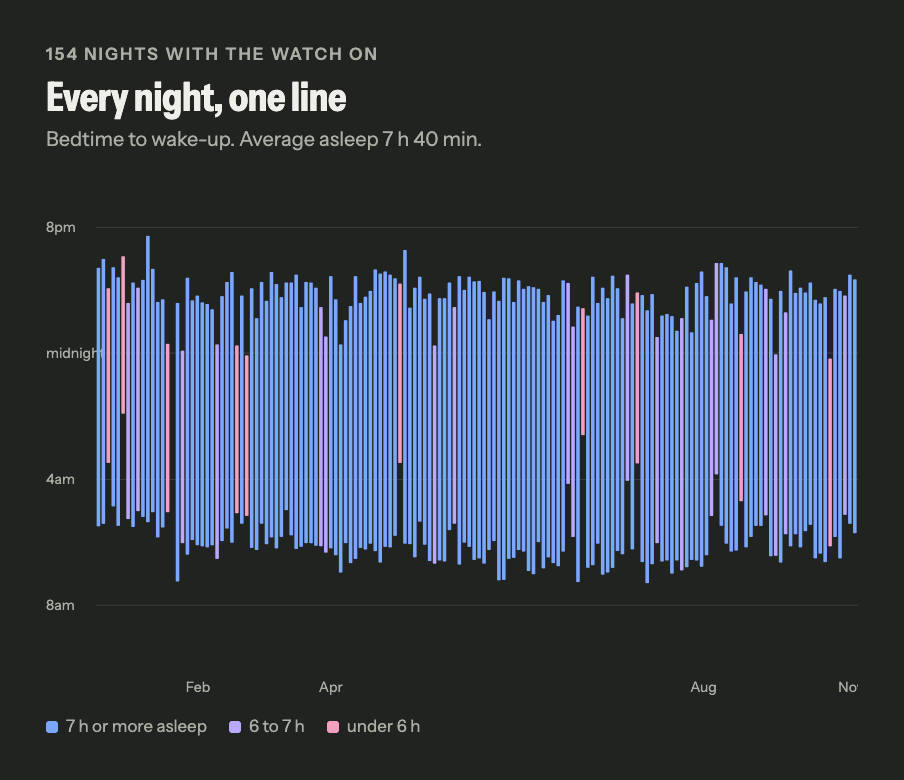
3. The VO2 max comeback
Monthly averages smooth out single readings, and the marks turn a line into a story: a peak, a low and the climb back.
VO2 max on Apple Watch is an estimate from outdoor walks, runs and hikes with heart rate. Months with few readings move more, so the count of days per month matters.
Using the telo connector, read my VO2 max month by month, as far back as it goes. Build an artifact with an area chart of it. Mark my earlier peak, the lowest month after that peak and today, treating this month as partial, and show how many days with a reading each month has. Label it as an Apple Watch estimate.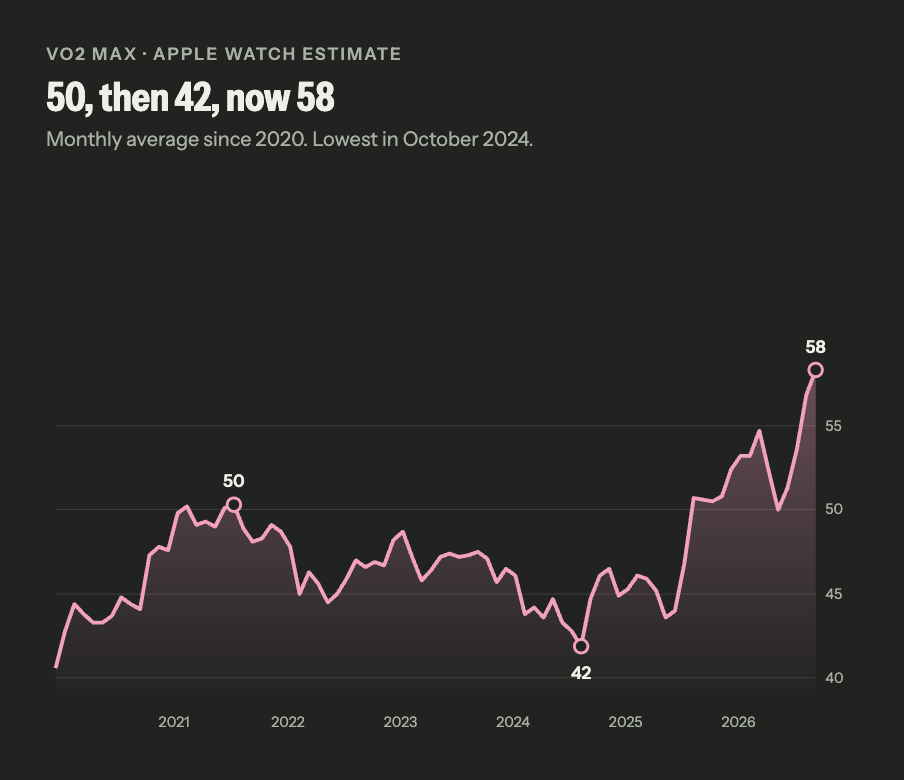
4. Your Wrapped
Six tiles, one number each. It is the easiest of the five to share, and the numbers underneath let you check every tile.
Indoor rides often have no distance, so km cycled can come out low; the prompt asks Claude to say how many rides lack it.
Using the telo connector, read my last 12 months of workouts and HRV. Build a Spotify Wrapped style artifact: six bold colored tiles with km cycled, km run, total training hours, my longest ride or run by distance, my best HRV month and my favorite start time. Skip walks, say how many rides have no distance, and list the numbers behind each tile below.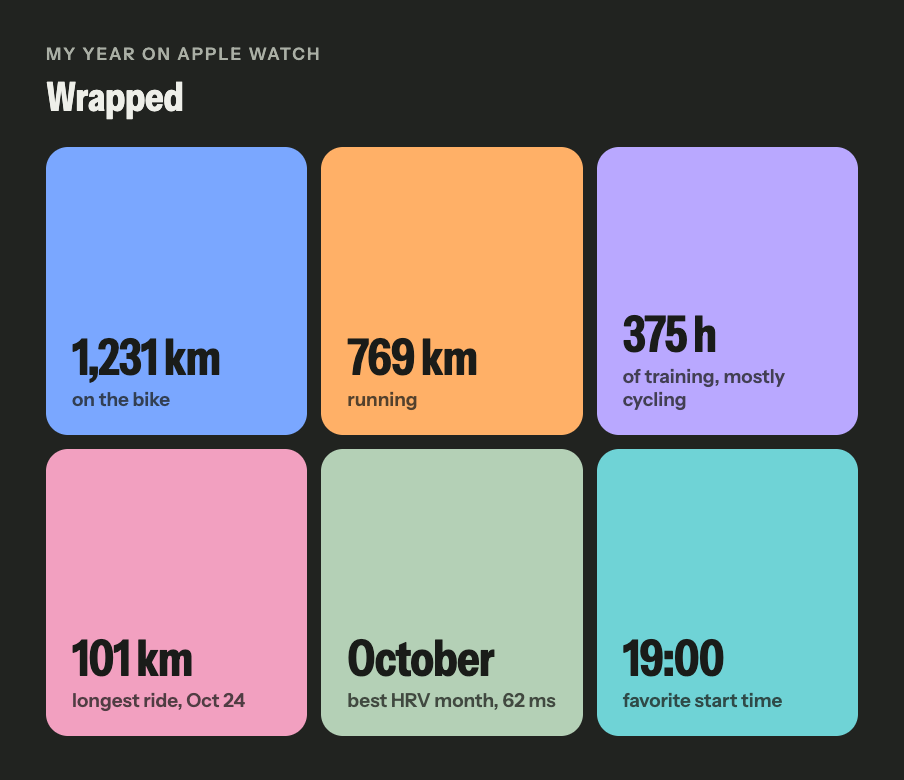
5. Race week on one screen
Four cards answer the question before a race without a single recommendation: where recovery sits against your own baseline, how you slept, how much you trained.
The dashed line is your last 30 days, not a population average. For the questions behind this screen, see the race day guide.
Using the telo connector, read my HRV, resting heart rate and sleep for the last 37 days and my training for the last 8 weeks. Build a one-screen dashboard artifact with four cards: HRV and resting heart rate for the last 7 days against the 30 days before, each with a sparkline and a dashed baseline; my last 7 calendar nights of sleep as bars, showing missing nights; and weekly training hours without walks, with the current week marked partial. No advice.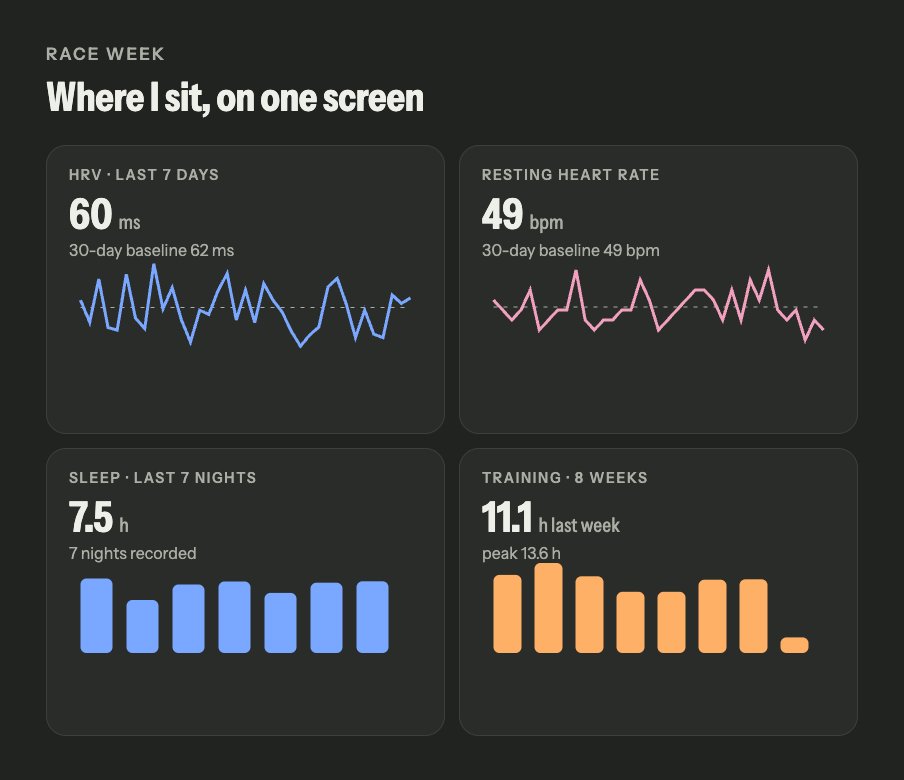
Keep the page
An artifact stays in the conversation, and Claude can update it: ask for another color, another range or a comparison with last year. To refresh it with new data, ask again in the same chat and it reads telo again.
If you publish an artifact, remember that it carries your numbers. None of this is medical advice: telo makes your records readable, it does not interpret your health.
Practical questions
Do I need to code?
No. You paste the prompt, and Claude reads your data through telo and writes the page itself, inside the conversation. To change anything, just ask in plain words.
Does it work in ChatGPT?
The prompts read the same data in ChatGPT with telo connected, and it can draw charts. Interactive pages with hover and themes are strongest in Claude artifacts.
Is my data public?
No. The artifact stays in your conversation until you choose to publish it. If you do, it carries the numbers it shows, so check before you share.
Sources and availability
Plans, regions and interfaces can change. Check the official sources before setting up.
How this guide was prepared
Each prompt was run on 5 November 2026 against one person’s real Apple Health data through telo, in a fresh session with no other context, and the wording was tightened where the first results were ambiguous. The images are the founder’s own data, shown with his permission. Your interface will look different: the layout comes from Claude, the numbers come from your history. Prepared with AI assistance.