Upload limit is not reading limit
Each assistant has two different ceilings. The first is the size of the file it accepts. The second is how much text it can read at once, measured in tokens. An Apple Health export usually passes the first and blows through the second.
In ChatGPT, OpenAI's help gives 512 MB per file and 2 million tokens per text document; spreadsheets are exempt from the token count, at about 50 MB. In Claude, Anthropic's help gives 500 MB per file and up to 20 files per chat, warns that token limits may apply based on the length of extracted text, and suggests splitting large documents. When Claude analyzes with code (file creation and data analysis), the ceiling is 30 MB per file.
OpenAI estimates 1 token per 4 characters of English text. By that count, 2 million tokens is about 8 MB of text, and XML, full of digits and quotes, gets fewer characters per token. A 220 MB export.xml, the size of the 1 million record sample file from our CSV guide, would be tens of millions of tokens: several times the ceiling. This is an estimate, not an upload test.
| File | Size | Fits the upload? | Fits the reading? |
|---|---|---|---|
| export.xml with 1 million records (illustrative sample) | 220 MB | 220 MB is under ChatGPT’s 512 MB file limit. For Claude, convert to CSV. | No: tens of millions of tokens, against 2 million in ChatGPT (estimate) |
| CSV of one data type, one row per measurement | Tens of MB | Depends: may pass ChatGPT's roughly 50 MB for spreadsheets and Claude's 30 MB for analysis | Through data analysis, yes, if it fits the upload |
| CSV of one data type, one row per day, 10 years | About 3,650 rows, under 200 KB (estimate) | Yes, in both | Yes, in both |
From the export to a file the assistant can read
The path is to export once, pick the question and send only the data type it needs, totaled per day. The script below streams export.xml, the same way as the tested script in our CSV guide, and writes a CSV with date, number of samples, sum and mean per day. It needs only Python 3.
- On the iPhone, open the Health app, tap Summary, your picture and, at the bottom of your profile, Export All Health Data. Confirm with Export.
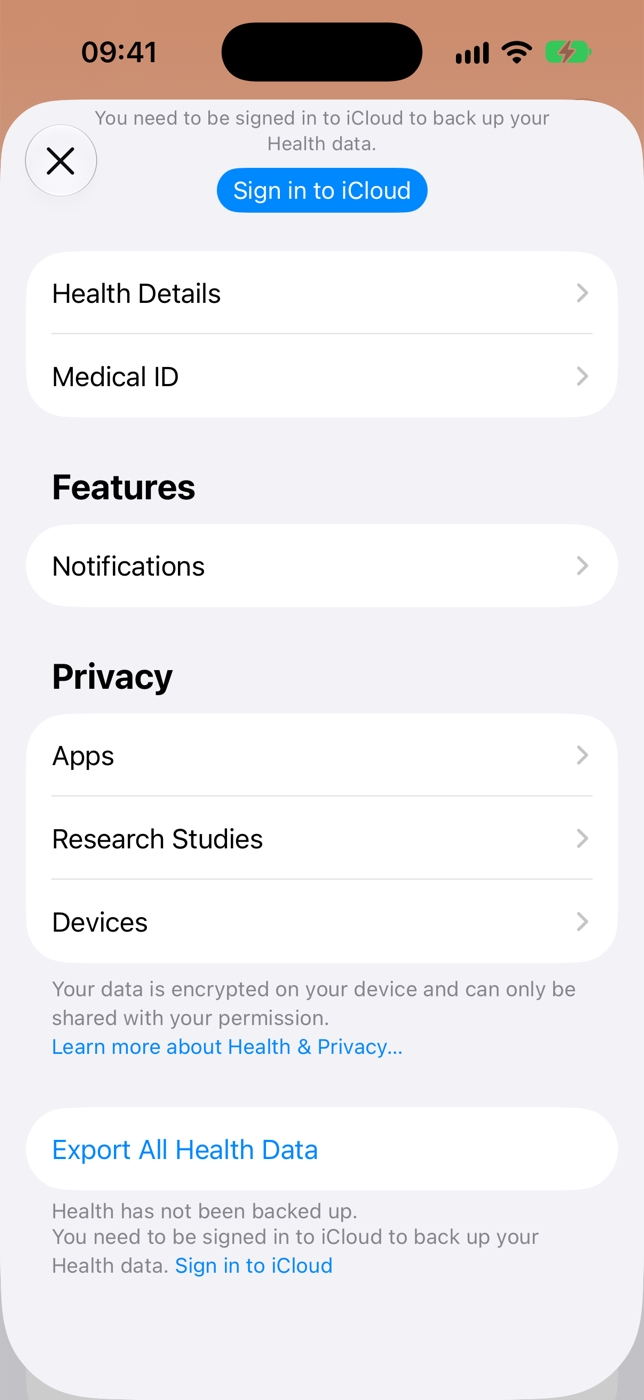
Health app profile. iPhone simulator, iOS 27, 2026-11-14. - On the share sheet, tap Save to Files and move the file to your computer. Do not send the ZIP straight to the assistant.
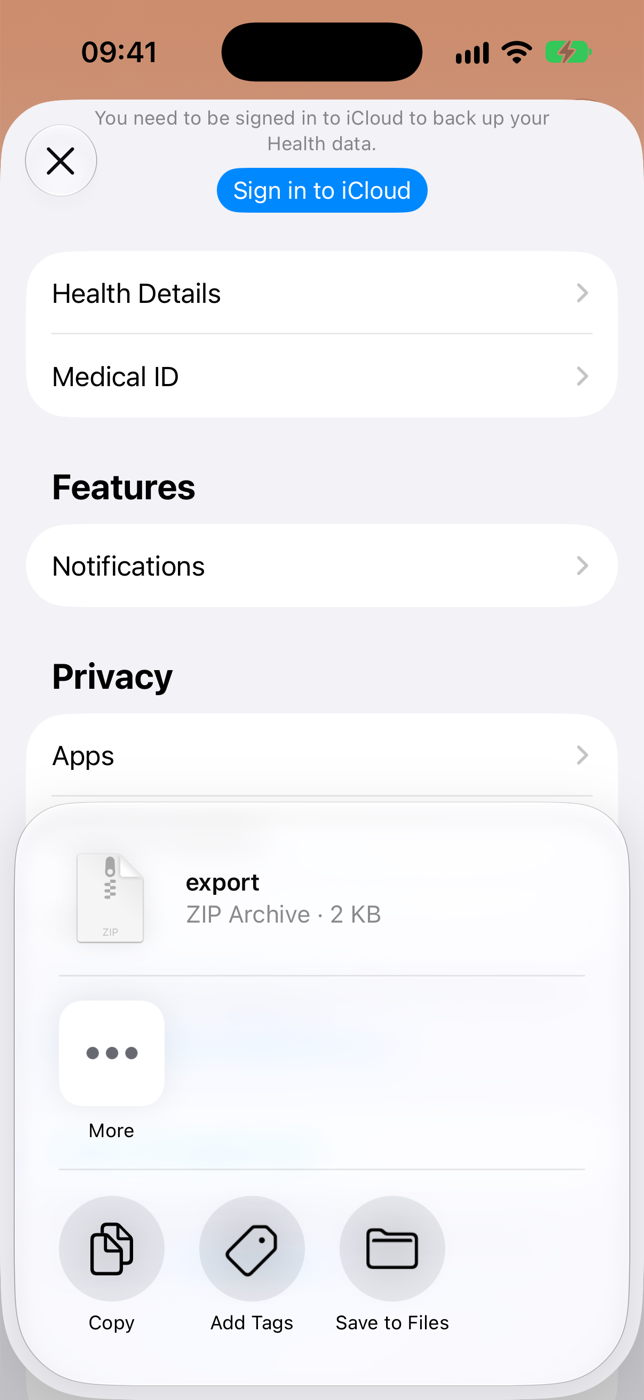
The share sheet. The 2 KB size is from an empty simulator; a real export is much larger. iOS 27, 2026-11-14. - On the computer, unzip the file. The records are in apple_health_export/export.xml.
- Save the code below as per_day.py next to the apple_health_export folder and run in Terminal: python3 per_day.py apple_health_export/export.xml HKQuantityTypeIdentifierStepCount Watch
- The last argument is optional and filters the source by name (here, only what came from the watch). You get HKQuantityTypeIdentifierStepCount-per-day.csv with one row per day.
- Send that CSV to ChatGPT or Claude and ask your question. For heart rate, use HKQuantityTypeIdentifierHeartRate and read the mean column, not the sum.
import csv, sys
import xml.etree.ElementTree as ET
from collections import defaultdict

src, want = sys.argv[1], sys.argv[2]  # export.xml HKQuantityTypeIdentifierStepCount
only = sys.argv[3] if len(sys.argv) > 3 else None  # optional: part of the source name
days = defaultdict(lambda: [0, 0.0])
events = ET.iterparse(src, events=("start", "end"))
_, root = next(events)
for event, el in events:
    if event == "end" and el.tag == "Record":
        if el.get("type") == want and (only is None or only in el.get("sourceName", "")):
            day = days[el.get("startDate")[:10]]
            day[0] += 1
            day[1] += float(el.get("value"))
        root.clear()
name = want + "-per-day.csv"
with open(name, "w", newline="", encoding="utf-8-sig") as out:
    w = csv.writer(out)
    w.writerow(["date", "samples", "sum", "mean"])
    for d in sorted(days):
        n, total = days[d]
        w.writerow([d, n, round(total, 2), round(total / n, 2)])
print(len(days), "days in", name)
A common mistake: steps counted twice
When the iPhone and the Apple Watch record steps at the same time, the Health app does not add them up: it uses the source at the top of the priority list, a rule Apple documents. export.xml does not apply that rule. It carries each source's records, with the source's name in sourceName.
If you sum every step record in the export, or ask the assistant to, you get a total higher than the Health app's on days you carried both. The assistant cannot know this on its own: it sees valid rows and adds them.
The paths side by side
| Path | Price | What it needs | Limit | Source, date |
|---|---|---|---|---|
| Upload the whole export to ChatGPT | Included in ChatGPT; the Free plan has fewer uploads per day | Computer or the ChatGPT app | 512 MB per file and 2 million tokens per text document; export.xml goes past that | OpenAI Help |
| Upload the whole export to Claude | Included in Claude | Computer or the Claude app | 500 MB per file and 20 per chat; 30 MB per file for analysis with code | Claude Help Center |
| Export + per day script, then the CSV to the assistant | Free | Computer with Python 3; export again for new data | One metric per file; the file is a snapshot of the day you exported | Apple Support |
| ChatGPT Health | Included in ChatGPT | iPhone with the ChatGPT app; a US account | US only; Apple Health connects through the iPhone app, not the web | OpenAI Help |
| Health in the Claude app | Pro, Max or Ultra plans | iPhone with the Claude app | Beta, US only; reads Apple Health, does not write | Claude Help Center |
| telo | Last 7 days in chat on Free. Full synced history on Pro, US$49 per year in the US store. | iPhone with the telo app | Reads synced daily metrics, nights of sleep and workouts. For individual measurements, use Apple’s XML export. | App Store |
Ask about this week’s sleep with telo
In the telo iPhone app, choose which Apple Health data to share. Connect the same telo account to Claude or ChatGPT and ask “Which nights did I sleep the longest this week?” Next week, your assistant can look up the nights your iPhone has synced since.
Free gives your assistant access to the last 7 days. With Pro, you can compare your full synced history, such as the month before and after a shift change. If you prefer a spreadsheet, download the CSV files from your account on the web, including on Free.
Practical questions
Why does ChatGPT reject or cut off my export.xml?
ChatGPT caps text documents at 2 million tokens. A large XML file can exceed that limit even if it is under 512 MB. For a question about steps, send a CSV with a daily total.
Does Claude accept the Apple Health export?
Anthropic lists CSV as a supported chat format. Convert the metric you want to explore, attach the CSV and ask about the dates you care about.
What is the upload limit in ChatGPT and Claude?
ChatGPT: 512 MB per file, 2 million tokens per text document and about 50 MB for spreadsheets. Claude: 500 MB per file and 20 per chat, 30 MB for analysis with code. Figures from the official help pages, checked on 2026-11-15.
Can I use ChatGPT data analysis instead of having it read the text?
Yes. Attach the CSV and ask for your average daily steps each week. Data analysis can read the rows with code. Ask how many days went into each average so you can check the comparison.
Why does the assistant's step total not match the Health app?
The export carries iPhone and Apple Watch steps separately, and the Health app uses only the priority source when both count at the same time. Filter to one source before summing.
Does this work outside the US?
Yes. telo connects Apple Health to your assistant where the telo app and the connector are available, including Brazil. You can also attach a CSV wherever your assistant account supports file uploads.
Sources
- OpenAI Help: Uploading files to ChatGPT, checked on 2026-11-15
- OpenAI Help: What are tokens and how to count them, checked on 2026-11-15
- OpenAI Help: What is ChatGPT Health, checked on 2026-11-15
- Claude Help Center: Upload files to Claude, checked on 2026-11-15
- Claude Help Center: Create and edit files with Claude, checked on 2026-11-15
- Claude Help Center: Use Claude with iOS apps, checked on 2026-11-15
- Apple Support: Manage Health data (source priority), checked on 2026-11-15
- Apple Support: Share your data in Health on iPhone, checked on 2026-11-15
How this guide was prepared
We checked file formats, upload limits and health integration requirements in the OpenAI and Anthropic help centers on November 15, 2026. Apple Support documents the source priority rule. The table estimates tokens using the illustrative 220 MB XML file from our CSV guide and OpenAI’s approximation for English text. The screenshots show the Health app in the iOS 27 iPhone simulator on November 14, 2026.