Export from the Health app (official, free)
This is the only export Apple documents. It bundles everything the Health app stores, with no choice of metric or date range.
- Open the Health app on your iPhone.
- Tap Summary, then tap your picture or initials in the top right corner.
- Scroll to the bottom of your profile and tap Export All Health Data.
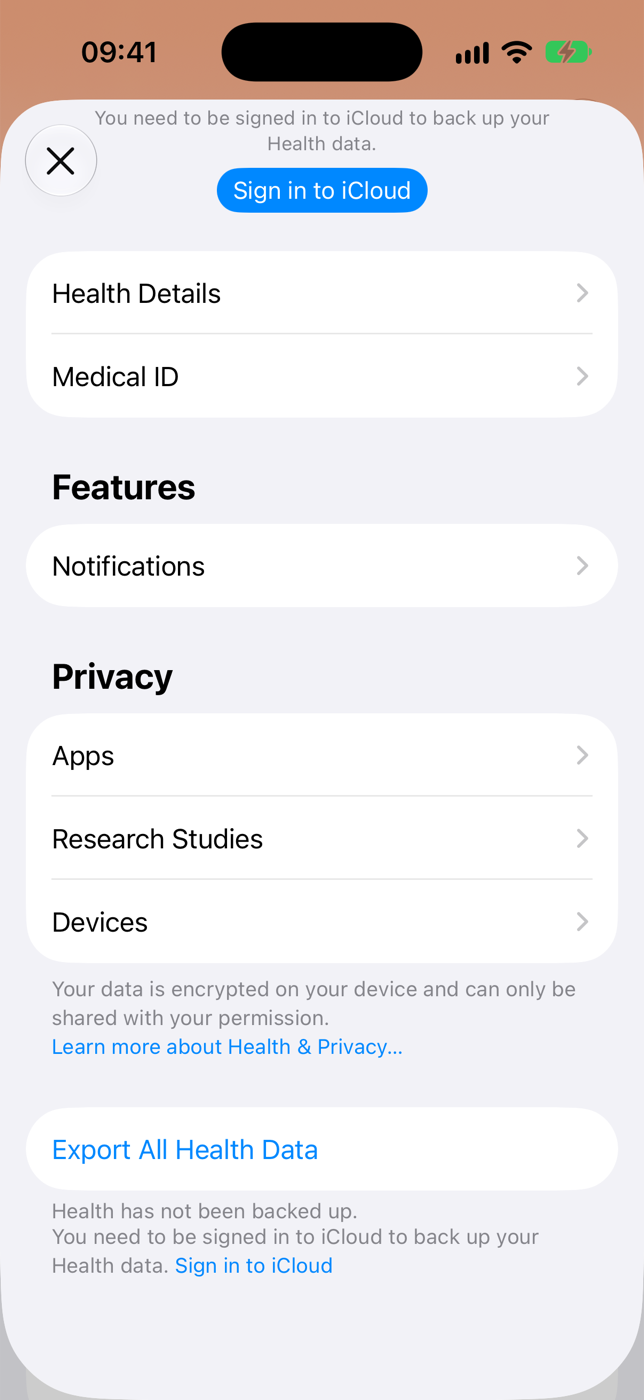
Health app profile. iPhone simulator, iOS 27, 2026-11-14. - Tap Export on the Export Health Data alert. With years of data, preparing the file can take a few minutes.
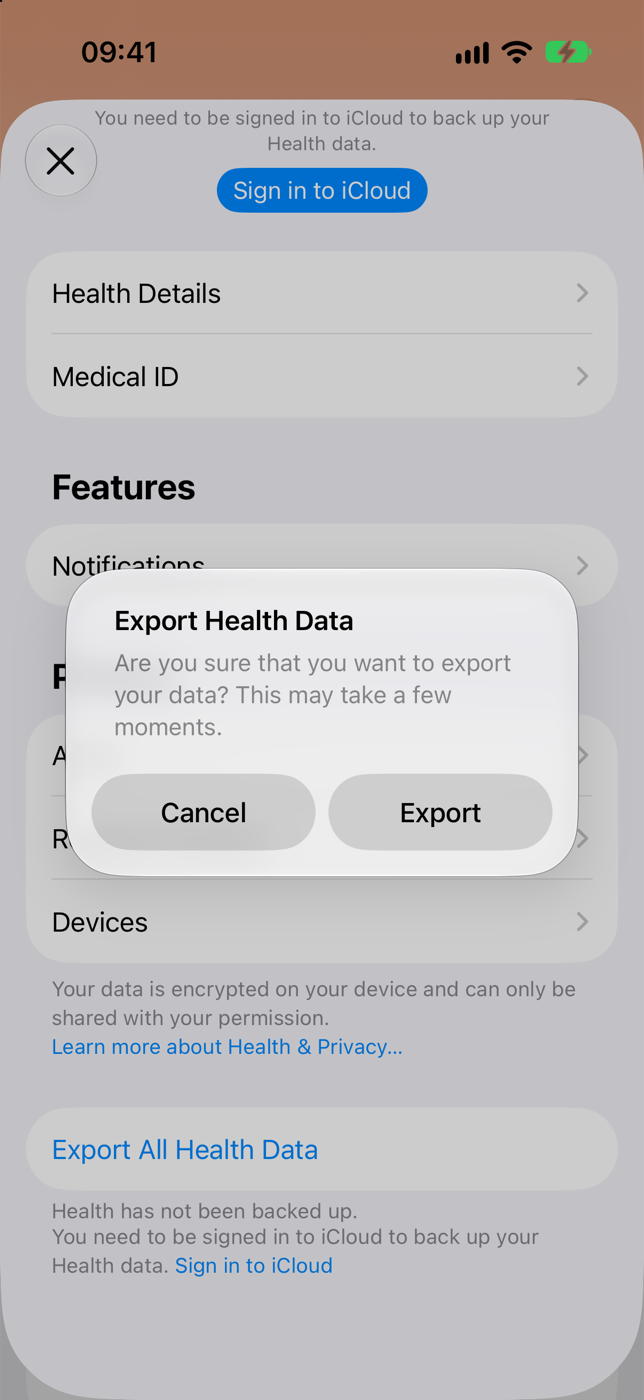
The confirmation alert. iPhone simulator, iOS 27, 2026-11-14. - The share sheet shows the file as export, a ZIP Archive. Tap Save to Files, the easiest way to open it on a computer later.
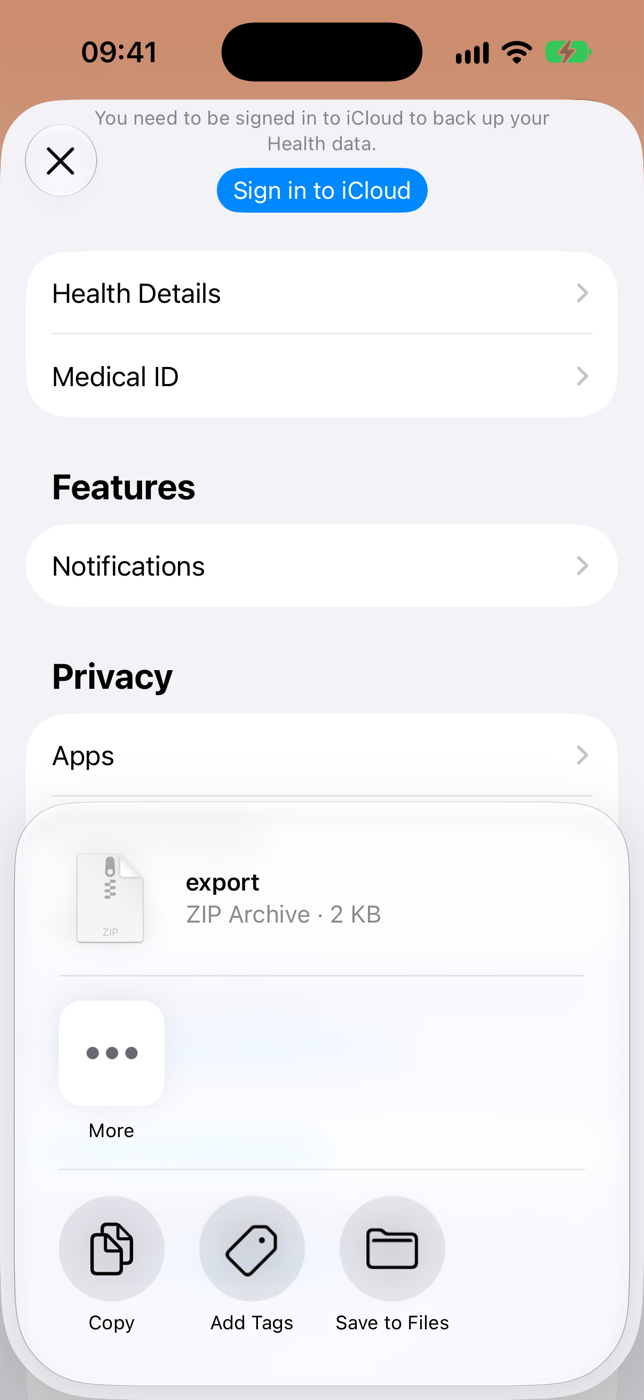
The share sheet. The 2 KB size is from an empty simulator; a real export is much larger. iOS 27, 2026-11-14. - On the computer, unzip export.zip. The records are in apple_health_export/export.xml.
Convert export.xml to CSV with Python
export.xml stores each measurement as a Record line with type, unit, dates and value. The script below streams the file, picks one data type and writes a CSV with start, end, value, unit and source. It needs only Python 3, nothing to install.
- Save the code below as to_csv.py next to the apple_health_export folder.
- In Terminal, in that folder, run: python3 to_csv.py apple_health_export/export.xml HKQuantityTypeIdentifierStepCount
- The CSV lands in the same folder, named after the data type, and the last printed line says how many records were written. Replace HKQuantityTypeIdentifierStepCount with the type you want, for example HKQuantityTypeIdentifierHeartRate for heart rate.
import csv, sys
import xml.etree.ElementTree as ET

src, want = sys.argv[1], sys.argv[2]  # export.xml HKQuantityTypeIdentifierStepCount
rows = 0
with open(want + ".csv", "w", newline="", encoding="utf-8-sig") as out:
    w = csv.writer(out)
    w.writerow(["startDate", "endDate", "value", "unit", "sourceName"])
    events = ET.iterparse(src, events=("start", "end"))
    _, root = next(events)
    for event, el in events:
        if event == "end" and el.tag == "Record":
            if el.get("type") == want:
                w.writerow([el.get("startDate"), el.get("endDate"), el.get("value"), el.get("unit"), el.get("sourceName")])
                rows += 1
            root.clear()
print(rows, "rows in", want + ".csv")
What our test showed
We built a sample export.xml in Apple's format with 1 million step and heart rate records (220 MB, illustrative values, not anyone's data). On an Apple Silicon Mac with Python 3.15, on 2026-11-13:
Time is about the same; memory is not. An estimate, not tested: at the same ratio, a real 1 GB export would need close to 4 GB of memory to load whole, enough to freeze an ordinary laptop. The streaming script stayed near 16 MB in the test.
| How the XML is read | Memory used | Time |
|---|---|---|
| Streaming (the script above) | 16 MB | 2.2 s |
| Loading the whole file (ElementTree.parse) | 964 MB | 1.9 s |
The paths side by side
| Path | Price | What it needs | Limit | Source, date |
|---|---|---|---|---|
| Health app export + script | Free | A computer with Python 3 | The iPhone only gives you XML; converting is up to you | Apple Support |
| Health Export CSV (app) | US$2.99; Remote US$4.99 a month or US$29.99 a year | iPhone | CSV and GPX straight from the iPhone; Remote syncs in the background | App Store |
| Health Auto Export (app) | Basic US$2.99 (one time); Premium US$1.99 a month, US$6.99 a year or US$24.99 lifetime | iPhone | The Free tier does not export; Basic exports by hand (CSV and JSON); automatic export only on Premium | App Store |
| telo | Pro US$49 a year; on Free the assistant sees only the last 7 days | iPhone with the telo app | CSV of daily values, sleep and workouts from your account on the web, once a day, Free included; totals per day, not every sample. Also gives the history to Claude, ChatGPT and other assistants (all of it only on Pro) and, on Pro, a JSON API | App Store |
When you do not need CSV
If the goal is to ask something about your data ("did my resting heart rate drop this year?"), exporting and converting every time is a chore. telo reads Apple Health through the iPhone app and lets Claude, ChatGPT and other assistants query the history directly, with no file. Developers can read the same data through the personal REST API, in JSON, up to 500 rows per call. If you only want spreadsheets, telo also hands its copy back as CSV: one row per day and metric, per night and per workout, in your time zone (Account > Your data on the web).
curl 'https://telo.health/api/v1/query_daily?metrics=steps&from=2026-11-01&to=2026-11-08&granularity=day' \
-H "Authorization: Bearer $TELO_API_KEY"Practical questions
Can Apple Health export CSV directly?
No. The Health app export creates an export.zip with the data in XML. For CSV, convert export.xml with a script or use an App Store app that writes CSV.
Can I export just one metric or one date range?
Not with the official export, which takes everything at once. The script in this guide picks one data type; the apps in the table let you choose metric and range on the iPhone.
Why is export.xml so large?
Every measurement is one line, and the watch measures heart rate many times a day. A few years of use easily reach hundreds of megabytes.
Where does the exported file go?
Wherever you chose on the share sheet. With Save to Files, export.zip is in the folder you picked in the Files app (On My iPhone or iCloud Drive). If you sent it by AirDrop to a Mac, it goes to Downloads.
Can I export only workouts or only sleep?
Not with the official export. After exporting, change the type in the script: HKCategoryTypeIdentifierSleepAnalysis for sleep. Workouts are Workout lines, not Record, and need another script; the apps in the table export workouts and sleep separately on the iPhone.
How do I open export.xml in Excel?
Do not open the XML directly. Convert it to CSV, one file per data type, and check that the CSV has fewer than 1,048,576 rows, the maximum for an Excel worksheet.
Does telo export CSV?
Yes, since November 2026. In your telo account on the web, Your data > Download everything (CSV) gives a zip with daily values, sleep, workouts and which AI read what, with times in your time zone. It holds what the iPhone sent to telo, totaled per day, not every Apple Health sample; for raw samples, use the Health app export. Once a day, on Free too.
Sources and availability
Plans, regions and interfaces can change. Check the official sources before setting up.
- Apple Support: Share your data in Health on iPhone, checked on 2026-11-14
- Microsoft: Excel specifications and limits, checked on 2026-11-13
- Microsoft: what to do if a data set is too large for the Excel grid, checked on 2026-11-13
- Python: xml.etree.ElementTree.iterparse, checked on 2026-11-13
How this guide was prepared
On 2026-11-14 we checked the export steps on Apple's support page and prices and plans on the App Store pages; the row limit comes from Microsoft's documentation, checked on 2026-11-13. The screenshots are from the Health app in the iPhone simulator (iOS 27, no data and no iCloud account) on 2026-11-14, which is why the profile shows a backup warning. The script was measured in our own session on 2026-11-13 on a sample export.xml in Apple's format with 1 million illustrative records, on an Apple Silicon Mac with Python 3.15; the 1 GB figure is an estimate at the same ratio. No one's health data was used.